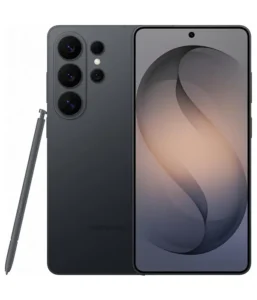

Three generations of Galaxy Ultra separate these two phones, and the gap is wider than a simple spec sheet suggests. The S23 Ultra launched as a benchmark device — the phone that proved Samsung could build a productivity powerhouse around the S Pen. The S26 Ultra inherits that identity but rethinks nearly every subsystem underneath. The question isn’t whether it’s better. It clearly is. The question is how much that improvement matters in real daily use, and whether S23 Ultra owners have reached the point where upgrading actually changes the experience.
Head-to-Head Camera Analysis
Both phones anchor their camera systems around a 200MP main sensor, and on paper that looks like a draw. In practice, the execution differs substantially. The S26 Ultra’s main camera opens to f/1.4 — a meaningfully wider aperture than the S23 Ultra’s f/1.7 — and uses a larger 1/1.3″ sensor. In low-light scenarios, that combination captures more light at the pixel level before any software processing touches the image. The S23 Ultra already produced strong low-light stills for its time, but the S26 Ultra pulls ahead clearly in dim indoor environments and evening shots where shadow detail and noise control matter most.
The telephoto story changes significantly between these generations. The S23 Ultra carries a 10MP periscope telephoto at 10x optical zoom — a genuine strength that made it one of the best zoom phones of its era. The S26 Ultra drops the 10x periscope entirely and replaces it with a 50MP 5x telephoto on a 1/2.52″ sensor. That’s a deliberate trade: less extreme reach but dramatically more resolution and sensor area at the 5x focal length. For portraits, architecture, and mid-range zoom subjects, the S26 Ultra’s 5x lens delivers sharper, more detailed images. For wildlife, sports, or subjects requiring 10x optical reach, the S23 Ultra’s periscope configuration retains a real-world advantage the S26 Ultra can’t fully replicate through digital zoom.
The ultrawide camera upgrades from a 12MP sensor on the S23 Ultra to a 50MP unit on the S26 Ultra, adding dual-pixel PDAF to the mix. That PDAF addition is more impactful than the resolution jump alone — it allows the ultrawide to autofocus reliably for macro-style shots and close-focus subjects that the S23 Ultra’s fixed-focus ultrawide handles inconsistently. Landscape ultrawide images also retain finer detail at 50MP, particularly when cropping after the fact. The S26 Ultra also gains 10-bit HDR video recording and stereo sound capture that the S23 Ultra doesn’t offer, extending its advantage into video workflows.
- Main camera aperture: S26 Ultra opens to f/1.4 vs S23 Ultra’s f/1.7 — more light gathered per frame in low-light scenes.
- Main sensor size: S26 Ultra’s 1/1.3″ sensor outpaces the S23 Ultra’s, retaining detail and reducing noise at high ISOs.
- Telephoto reach: S23 Ultra’s 10x periscope covers more distance; S26 Ultra’s 50MP 5x telephoto offers superior resolution at medium zoom ranges.
- Ultrawide: S26 Ultra upgrades to 50MP with PDAF; S23 Ultra’s 12MP ultrawide lacks autofocus capability.
- Video: S26 Ultra adds 10-bit HDR, stereo recording, and 4K at 120fps; S23 Ultra caps at 4K60fps on rear cameras.
- Laser AF: S26 Ultra adds Laser AF and Horizon Lock; S23 Ultra does not include either feature.
Performance & Real-World Usage
The chipset gap here is the largest of any spec comparison between these two phones. The S23 Ultra runs Snapdragon 8 Gen 2 on a 4nm process — a chip that was competitive at launch but now sits two full generations behind. The S26 Ultra uses Snapdragon 8 Elite Gen 5 on 3nm, with Oryon V3 cores clocking the performance cluster at 4.74 GHz. That’s not a generational refinement — it’s a fundamental architectural shift that touches everything from app launch times to AI processing speed to sustained gaming frame rates.
In heavy gaming sessions, the difference becomes tangible within the first twenty minutes. The S23 Ultra throttles noticeably under sustained GPU load, with frame rates dropping and surface temperature climbing. The S26 Ultra’s 3nm efficiency means the same workload generates less heat, allowing the Adreno 840 to hold higher frame rates longer before throttling kicks in. For casual gaming and everyday apps, the S23 Ultra still handles tasks without obvious lag — but push either phone into extended demanding workloads and the S26 Ultra’s headroom becomes apparent.
RAM configurations also separate them. The S23 Ultra’s 1TB model ships with 12GB RAM — matching the S26 Ultra’s base tier. But the S26 Ultra steps to 16GB RAM on its 1TB configuration, adding genuine breathing room for heavy multitasking, large file manipulation, and the kind of on-device AI inference that modern Samsung software increasingly relies on. Storage bandwidth advances from UFS 4.0 on the S23 Ultra to UFS 4.X on the S26 Ultra, accelerating large file transfers and camera buffer clearing — noticeable when shooting bursts of 200MP RAW files.
- Chipset architecture: S26 Ultra’s Oryon V3 cores represent a fundamental departure from the S23 Ultra’s Cortex-based Snapdragon 8 Gen 2.
- Sustained gaming: S26 Ultra throttles later and runs cooler; S23 Ultra shows noticeable frame rate drops in extended GPU-heavy sessions.
- Peak RAM: S26 Ultra’s 1TB model carries 16GB RAM; S23 Ultra’s 1TB variant tops out at 12GB.
- Storage speed: S26 Ultra uses UFS 4.X; S23 Ultra uses UFS 4.0 — faster sequential read and write on the newer phone.
Battery Life & Charging Experience
Both phones carry identical 5000mAh batteries, but the S26 Ultra’s 3nm chipset burns significantly less power for equivalent workloads. In day-to-day use — a mix of calls, browsing, photography, and streaming — the S26 Ultra consistently delivers longer screen-on time despite the same cell capacity. The S23 Ultra’s 4nm Snapdragon 8 Gen 2 is not inefficient by older standards, but up against a 3nm successor running the same tasks, the power draw differential compounds meaningfully across a full day.
The charging speed gap is substantial and unambiguous. The S26 Ultra charges at 60W wired, reaching 75% in 30 minutes. The S23 Ultra charges at 45W wired, hitting 65% in the same window. That 15W difference translates to a noticeably shorter cable session — particularly useful for the quick top-up before leaving home. Wireless charging improves even more dramatically: the S26 Ultra delivers 25W wireless charging via Qi2.2, while the S23 Ultra caps at 15W Qi. Both phones support 4.5W reverse wireless charging for accessories. For Galaxy Watch and Buds users who regularly top up earbuds off the back of the phone, that feature stays consistent across both generations.
- Battery capacity: Both carry 5000mAh; S26 Ultra’s efficiency advantage extends real-world endurance.
- Wired charging: S26 Ultra at 60W hits 75% in 30 minutes; S23 Ultra at 45W reaches 65% in the same time.
- Wireless charging: S26 Ultra jumps to 25W Qi2.2; S23 Ultra delivers 15W Qi — a significant speed increase.
- Reverse wireless: Both provide 4.5W reverse wireless for accessories — no change between generations.
Display, Design & Build Feel
The S26 Ultra steps up to a 6.9-inch Dynamic LTPO AMOLED 2X panel against the S23 Ultra’s 6.8-inch Dynamic AMOLED 2X. The resolution difference is minor — both hit around 500ppi — but the panel generation and brightness ceiling diverge sharply. The S26 Ultra reaches 2600 nits peak, while the S23 Ultra caps at 1750 nits. In direct sunlight, that gap is visible: the S26 Ultra remains readable in conditions where the S23 Ultra demands shade or reduced angle. The S26 Ultra’s display also carries a Privacy Display feature, letting it limit viewing angles on demand — the S23 Ultra has no equivalent.
Glass protection on the front panel jumps from Gorilla Glass Victus 2 on the S23 Ultra to Corning Gorilla Armor 2 on the S26 Ultra, which adds a Mohs level 6 DX anti-reflective coating. The practical effect is a screen surface that handles minor scratches better and reduces glare in bright environments without any screen protector applied. The back of the S26 Ultra retains Gorilla Glass Victus 2, keeping the overall build quality consistent. Both phones use aluminum frames, though the S26 Ultra moves to Armor Aluminum 2 — Samsung’s upgraded alloy — while the S23 Ultra uses the original Armor Aluminum.
In hand, the weight difference is notable. The S23 Ultra weighs 234g and measures 8.9mm thick — substantial even by Ultra standards. The S26 Ultra trims down to 214g and 7.9mm, which sounds like minor number shuffling but translates to a meaningfully more comfortable device during extended use. Both phones retain IP68 water resistance. Connectivity takes a substantial step forward on the S26 Ultra: Wi-Fi 7 and Bluetooth 6.0 replace the S23 Ultra’s Wi-Fi 6e and Bluetooth 5.3. The S26 Ultra also adds DisplayPort 1.2 output through its USB-C port — absent on the S23 Ultra — enabling wired external display connections at full resolution.
Software, Updates & AI Features
This section tells the most decisive story for S23 Ultra owners considering an upgrade. The S23 Ultra launched with Android 13 and Samsung committed to four major OS upgrades — meaning it reaches its software end of life substantially sooner than the S26 Ultra, which launches on Android 16 with seven major upgrade guarantees. Depending on when the S23 Ultra was purchased, its remaining supported update window may be limited to one or two major Android versions. The S26 Ultra starts that same clock from Android 16 with seven years ahead.
One UI 8.5 on the S26 Ultra is built to leverage the Snapdragon 8 Elite Gen 5’s NPU for on-device AI tasks — real-time translation, generative editing, intelligent scene detection, and Galaxy AI features that process locally rather than relying on cloud offloading. The S23 Ultra runs One UI 8 and receives the same Galaxy AI features at the software level, but the older chipset’s NPU handles those tasks more slowly and with higher power cost. For AI-heavy workflows — particularly generative photo editing and live translation — the gap between running those features on Snapdragon 8 Gen 2 versus Snapdragon 8 Elite Gen 5 is tangible in response time.
Both phones include Samsung DeX and Ultra Wideband support, keeping feature parity on those fronts. The S Pen situation does shift between generations — the S23 Ultra carries an S Pen with Bluetooth integration and its own accelerometer and gyro, while the S26 Ultra includes S Pen support but without the Bluetooth-enabled remote gesture functionality. For users who relied on S Pen Bluetooth features — using it as a remote shutter or slideshow clicker — that omission on the S26 Ultra is a genuine downgrade worth acknowledging directly.
Price & Value Proposition
The S23 Ultra now sells at significantly reduced prices through carriers and retailers, often appearing at substantial discounts with trade-in promotions. At those reduced prices, its camera system, 10x periscope telephoto, S Pen with Bluetooth, and Samsung DeX support make it a strong productivity device with remaining software support. The S26 Ultra commands a full flagship premium that reflects the newer chipset, improved display, faster charging, and seven-year update commitment.
For buyers coming from an S21 Ultra or older device, the S26 Ultra is a clear recommendation without significant hesitation — the cumulative improvements across four-plus generations create a genuinely different experience. For S23 Ultra owners specifically, the calculus is harder. The camera improvements are meaningful but not transformative. The chipset jump is real. The charging speed increase is welcome. But the S Pen Bluetooth removal stings for those who used that feature regularly, and the software end-of-life timeline on the S23 Ultra may still have meaningful runway depending on purchase date.
Final Verdict: Which One Should You Buy?
Buy the Samsung Galaxy S26 Ultra if: the phone is a new purchase or an upgrade from S22 Ultra and older, seven years of software support is a priority, faster charging and significantly improved wireless speeds matter, the wider-aperture main camera and upgraded ultrawide align with shooting habits, or the slimmer and lighter build is welcome after carrying the S23 Ultra’s heavier frame.
Consider keeping the Samsung Galaxy S23 Ultra if: it’s already in hand and performing adequately, the 10x periscope telephoto is a critical tool in the workflow, S Pen Bluetooth integration is actively used for gesture or remote control features, or the software update window still has adequate runway for planned ownership duration.
For new buyers choosing between the two at current market prices, the S26 Ultra is the right long-term investment. For S23 Ultra owners, the honest assessment is that the upgrade is worthwhile — but not urgently required unless the chipset performance gap, charging speeds, or software longevity have become daily pain points.
Samsung Galaxy S26 Ultra vs Samsung Galaxy S23 Ultra Frequently Asked Questions
Is the camera on the Samsung Galaxy S26 Ultra significantly better than the S23 Ultra?
For most photography scenarios, yes. The S26 Ultra’s f/1.4 aperture and 1/1.3″ main sensor gather substantially more light than the S23 Ultra’s f/1.7 setup, improving low-light performance noticeably. The ultrawide upgrades from 12MP to 50MP with PDAF, and 10-bit HDR video arrives as a new addition. The one area where the S23 Ultra holds an advantage is its 10x periscope telephoto, which the S26 Ultra replaces with a 50MP 5x lens — better resolution at 5x, less reach at longer distances.
Does the Galaxy S26 Ultra still include the S Pen?
The S26 Ultra includes an integrated S Pen, but without the Bluetooth functionality present on the S23 Ultra’s stylus. The S23 Ultra’s S Pen includes its own accelerometer and gyro, enabling gesture-based remote control features — acting as a remote shutter, slideshow controller, and more. The S26 Ultra’s S Pen functions as a precision stylus for writing, drawing, and navigation, but drops the Bluetooth-enabled remote gesture capability.
How much faster does the Galaxy S26 Ultra charge compared to the S23 Ultra?
The S26 Ultra charges at 60W wired, reaching 75% in 30 minutes. The S23 Ultra charges at 45W wired, hitting 65% in the same window. Wireless charging improves from 15W Qi on the S23 Ultra to 25W Qi2.2 on the S26 Ultra — a substantial wireless speed increase. Both phones support 4.5W reverse wireless charging.
Is the display meaningfully better on the Galaxy S26 Ultra?
Yes, in several ways. The S26 Ultra reaches 2600 nits peak brightness versus the S23 Ultra’s 1750 nits — a visible difference in direct sunlight readability. The front glass upgrades from Gorilla Glass Victus 2 to Gorilla Armor 2 with anti-reflective coating, reducing glare without a screen protector. The S26 Ultra also includes a Privacy Display mode that limits viewing angles on demand, which the S23 Ultra doesn’t offer.
How large is the chipset performance gap between the S26 Ultra and S23 Ultra?
It’s substantial. The S26 Ultra uses Snapdragon 8 Elite Gen 5 on 3nm; the S23 Ultra runs Snapdragon 8 Gen 2 on 4nm — two full chipset generations apart with a different CPU architecture. In sustained tasks like gaming, video editing, and AI processing, the S26 Ultra maintains higher performance levels with less thermal throttling. The S23 Ultra still handles daily tasks competently, but under extended load the gap becomes clearly measurable.
Does the S23 Ultra support the same software update timeline as the S26 Ultra?
No. Samsung committed to four major OS upgrades for the S23 Ultra and seven for the S26 Ultra — a three-year difference in guaranteed software support. Depending on when the S23 Ultra was purchased, its remaining major Android update window may be nearing its end. The S26 Ultra starts from Android 16 with seven full years of major updates ahead.
Which phone is better for zoom photography?
It depends on the zoom distance. The S23 Ultra’s 10x periscope telephoto reaches farther optically — better for wildlife, distant subjects, and sports where 10x optical zoom provides a real advantage. The S26 Ultra’s 50MP 5x telephoto captures more resolution and detail at medium zoom ranges. For portraits, street, and architectural photography at 3x to 5x, the S26 Ultra produces sharper results. For extreme reach, the S23 Ultra’s optical advantage holds.
Is the Galaxy S26 Ultra lighter and thinner than the S23 Ultra?
Yes, meaningfully so. The S26 Ultra weighs 214g and measures 7.9mm thick. The S23 Ultra weighs 234g and measures 8.9mm thick — 20g heavier and a full millimeter thicker. In extended daily use, particularly one-handed operation and pocket comfort, that difference registers clearly. Both phones share the same 163mm-range height and 78mm width, so the footprint is comparable but the S26 Ultra feels noticeably less chunky in hand.