
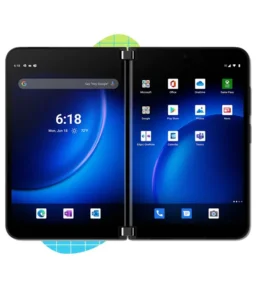
Microsoft Surface Duo 2 Overview, Features, and Buying Guide
The Microsoft Surface Duo 2 represents a bold attempt at reimagining smartphone productivity through its dual-screen design. Released in October 2021, this device breaks away from traditional foldable smartphones by offering two separate 5.8-inch AMOLED panels that unfold into an 8.3-inch workspace. Built around the Snapdragon 888 chipset and featuring a versatile camera system, the Surface Duo 2 targets professionals and multitaskers who demand more screen real estate for their daily workflows.
Unlike conventional foldables with a single flexible display, Microsoft’s approach uses two distinct screens connected by a hinge. This design allows users to run different apps simultaneously, drag content between screens, or span a single application across both panels. The device ships with Android 11 and includes stylus support for note-taking and creative work. With 5G connectivity, up to 512GB storage, and a premium glass-and-metal construction, the Surface Duo 2 positions itself as a productivity powerhouse rather than just another smartphone.
What Makes the Microsoft Surface Duo 2 Worth Buying?
The dual-screen configuration stands as the device’s most compelling feature. Each 5.8-inch AMOLED panel operates independently, giving users the flexibility to check emails while browsing the web, or reference documents while taking notes. When fully unfolded, the combined 8.3-inch display (1892 x 2688 pixels) delivers sharp visuals at 401 ppi with 90Hz refresh rate and HDR support. Peak brightness hits 800 nits, ensuring decent outdoor visibility.
Performance comes from the Snapdragon 888 processor, which was a flagship chipset at launch. The octa-core CPU handles multitasking smoothly, while the Adreno 660 GPU provides solid graphics performance. Users can choose between 128GB, 256GB, or 512GB of UFS storage, all paired with 8GB RAM. This hardware combination allows the device to manage multiple apps across both screens without significant slowdowns.
Camera capabilities received a major upgrade over the original Surface Duo. The rear setup includes a 12MP wide lens with optical image stabilization, a 12MP telephoto offering 2x optical zoom, a 16MP ultrawide camera, and a time-of-flight depth sensor. This quad-camera arrangement captures 4K video at up to 60fps with gyroscopic stabilization. The front-facing 12MP camera handles video calls and selfies, recording at 1080p.
Build quality reflects Microsoft’s premium positioning. Gorilla Glass Victus protects both the front displays and the rear panel, while the hinge mechanism feels robust through repeated folding cycles. At 284 grams, the device carries noticeable weight, but the slim 5.5mm profile when unfolded makes it surprisingly pocketable when closed (11mm thick). Stereo speakers enhance the multimedia experience, though there’s no headphone jack.
Connectivity covers all modern standards including 5G, Wi-Fi 6, Bluetooth 5.1 with aptX Adaptive, and NFC. The USB-C 3.2 port supports DisplayPort output and charges the 4449mAh battery at 23W. Dual sensors for the accelerometer, gyro, proximity, and compass accommodate the unique form factor, while a side-mounted fingerprint scanner provides biometric security.
Things to Know Before Choosing the Microsoft Surface Duo 2
Software optimization remains the biggest challenge. Android 11 wasn’t designed for dual-screen devices, so app compatibility varies significantly. While Microsoft’s own apps and many Google services work well, numerous third-party applications don’t properly span both screens or function awkwardly when split. The device has been discontinued, which raises concerns about long-term software support and updates beyond Android 11.
Battery life rarely impresses despite the 4449mAh capacity. Running two displays simultaneously drains power faster than single-screen phones, and heavy multitasking can require midday charging. The 23W charging speed feels modest compared to competitors offering 65W or faster, meaning you’ll wait over an hour for a full charge.
The camera system, while improved, doesn’t match dedicated camera phones in the same price range. Low-light photography shows more noise than flagship competitors, and the 2x optical zoom falls short of devices offering 5x or 10x telephoto capabilities. There’s no wireless charging, which seems like an oversight for a premium device.
Durability concerns center around the exposed screens. Unlike traditional foldables with an outer protective screen, both Surface Duo 2 displays remain vulnerable when closed. A single drop could damage both panels simultaneously. The hinge, while sturdy, creates a noticeable gap when folded that collects dust and debris.
App continuity frustrates some users. Switching between single-screen and dual-screen modes doesn’t always preserve your workflow seamlessly. Some apps restart or lose their state when moved between screens. Gaming performance, while capable, suffers from the unusual aspect ratio and split-screen layout that most games don’t support.
The lack of expandable storage means choosing the right capacity upfront is critical. Cloud storage helps, but costs accumulate over time. At 284 grams, extended one-handed use becomes uncomfortable, and the unconventional form factor makes finding protective cases difficult.
Is the Microsoft Surface Duo 2 Right for You?
Business professionals and productivity enthusiasts find the most value in the Surface Duo 2. Reading and editing documents while referencing emails, attending video calls while taking notes, or managing calendars alongside messaging apps all benefit from the dual-screen setup. Stylus support makes it particularly attractive for those who frequently annotate PDFs or sketch ideas during meetings.
Mobile multitaskers who constantly juggle multiple apps will appreciate having dedicated screen space for each task. Translating documents while viewing the original, comparing spreadsheets side-by-side, or following recipes while watching cooking videos all become more natural. The device essentially functions as a portable dual-monitor setup.
Content consumers seeking versatility can enjoy the large unfolded display for reading ebooks, browsing the web, or watching videos. The 8.3-inch screen provides a tablet-like experience in a device that fits in most pockets when folded. However, the unusual aspect ratio means black bars appear in most video content.
Average smartphone users should look elsewhere. The learning curve, app compatibility issues, and discontinued status make this a poor choice for those wanting a straightforward smartphone experience. People who primarily use their phone for social media, messaging, and casual photography will find the dual screens more cumbersome than beneficial.
Mobile gamers won’t find their ideal device here. While the Snapdragon 888 handles demanding games, the split-screen design conflicts with most mobile game interfaces. The lack of a high refresh rate beyond 90Hz and relatively modest battery life further limit gaming sessions.
Budget-conscious buyers should skip the Surface Duo 2 entirely. Even as a discontinued device, it originally commanded premium pricing, and its unique form factor doesn’t justify the cost for most users. Better camera phones, longer-lasting batteries, and more reliable software experiences exist at lower price points.
Photography enthusiasts will be disappointed. The camera system performs adequately but falls behind dedicated camera phones from Samsung, Apple, and Google. The lack of advanced computational photography and limited zoom capabilities make this a poor choice for serious mobile photographers.
Best Alternatives to the Microsoft Surface Duo 2
The Samsung Galaxy Z Fold series offers a more refined foldable experience with better software optimization and a continuous folding display instead of two separate screens. You’ll get superior cameras, faster charging, wireless charging, and longer software support, though at a higher price point.
Google Pixel phones provide the best Android software experience with guaranteed updates and industry-leading computational photography. If you value camera quality and clean software over the dual-screen gimmick, any recent Pixel flagship delivers better overall value.
The Samsung Galaxy S series represents traditional smartphone excellence with top-tier cameras, faster charging, wireless charging capabilities, and proven reliability. You’ll sacrifice the dual-screen productivity for a more polished, versatile smartphone that excels at everything.
For productivity-focused users not committed to the dual-screen concept, standard flagship phones paired with a tablet might serve better. A mid-range phone plus an iPad or Android tablet costs less combined while offering superior versatility and app compatibility.
Microsoft Surface Duo 2 Frequently Asked Questions
Does the Microsoft Surface Duo 2 support wireless charging?
No, the Surface Duo 2 only supports wired charging at 23W through its USB-C port. The device lacks wireless charging capabilities, which is unusual for a premium smartphone. You’ll need to rely on the included cable for all charging needs, and a full charge typically takes over an hour due to the relatively modest charging speed compared to modern flagships offering 65W or faster wired charging.
Can I use the Surface Duo 2 with one screen off to save battery?
Yes, the Surface Duo 2 allows you to use just one screen while keeping the other off, effectively functioning as a standard single-screen smartphone. This mode significantly extends battery life since you’re only powering one display instead of two. Many users adopt this approach during light usage periods and unfold both screens only when multitasking or consuming media, helping the 4449mAh battery last through a full day.
How does app compatibility work on the dual screens?
App compatibility varies considerably on the Surface Duo 2. Microsoft’s own applications like Office, Edge, and Outlook work excellently across both screens, as do many Google apps. However, numerous third-party apps weren’t designed for dual-screen devices and may display awkwardly when spanned or refuse to expand beyond a single panel. Some apps restart when moved between screens, and gaming apps rarely utilize both displays effectively due to the unconventional aspect ratio and split nature of the screens.
Is the Surface Duo 2 still receiving software updates?
Software support for the Surface Duo 2 is limited since the device has been discontinued. It shipped with Android 11 and received updates for a period after launch, but long-term support remains uncertain compared to active product lines from Samsung, Google, or Apple. Users should not expect major Android version updates or extended security patches beyond the typical support window for discontinued devices.
Can the Surface Duo 2 replace a tablet for productivity work?
The Surface Duo 2 can handle many tablet-like productivity tasks thanks to its 8.3-inch combined display and stylus support. It works well for document editing, note-taking, email management, and web browsing. However, true tablets offer larger screens, better app optimization for big-screen layouts, and more comfortable extended use. The Surface Duo 2 serves better as a compact hybrid that fits in your pocket while providing more workspace than a standard phone, rather than a full tablet replacement.